Who should you pitch this month, and what should you sell them? Open the calendar and you will know in ten seconds.
The Local Money Calendar maps 19 local niches across all 12 months, sorts them by who is heating up right now, and hands you a ready campaign and an outreach message for each one. A built-in AI engine writes the whole campaign in one click. It runs in your browser. Nothing to install.
One-time payment · Instant access · Works on any device
200+Products created
8,000+Customers served
50,000+Products sold
40+Deal-of-the-Day awards
The real problem
The hardest part of consulting is not the work. It is knowing who to call.
You can build the landing page. You can run the campaign. What stalls you is the blank prospect list at the start of the month, when you sit down to do outreach and have no idea who to contact or what to say.
Every business on the list feels like a cold, random guess. You have nothing specific to offer, so the message comes out as "let me know if you ever need marketing help." Another month ends with almost no outreach sent, because starting from nothing every time is exhausting.
So income feels like feast or famine. A project lands, you stop prospecting, the project ends, and you are back to the blank list.
After enough cycles the quiet question shows up: maybe I am just not cut out to run this business.
You are cut out for it. You have just been prospecting with no regard for timing, which is the one thing that makes local outreach easy.
The shift
Local demand is seasonal, and it repeats the same way every year.
A roofer's phone rings in spring and after storms. "Frozen pipe repair" spikes in deep winter. Restaurants live and die by Valentine's and December. Gyms flood in every January. None of it is random, and none of it is a secret. It is a pattern you can set your calendar to.
Roofing, in spring
Searches climb the week the weather turns. Pitch a "beat the spring rush" inspection campaign before the phones start ringing.
Restaurants, in February
Valentine's is one of the biggest nights of their year. Get their reservations page live before it books out.
Gyms, in January
The single biggest sign-up month there is. Have their join-online offer ready before January 1.
Picture it: it is the 1st of the month. You open the calendar and three local businesses sit at the top, marked peak demand, each with a one-line reason and a campaign already written. You copy the outreach, drop in your client's name, and send it before your coffee is cold.
Or this: you send a roofer a "beat the spring rush" pitch the exact week roofing searches start climbing, and you get a reply that says "how did you know we were just talking about this?"
What you get
Everything inside The Local Money Calendar
A self-contained web app you open in any browser. Here is the whole thing, and everything that comes with it.
The Local Money Calendar
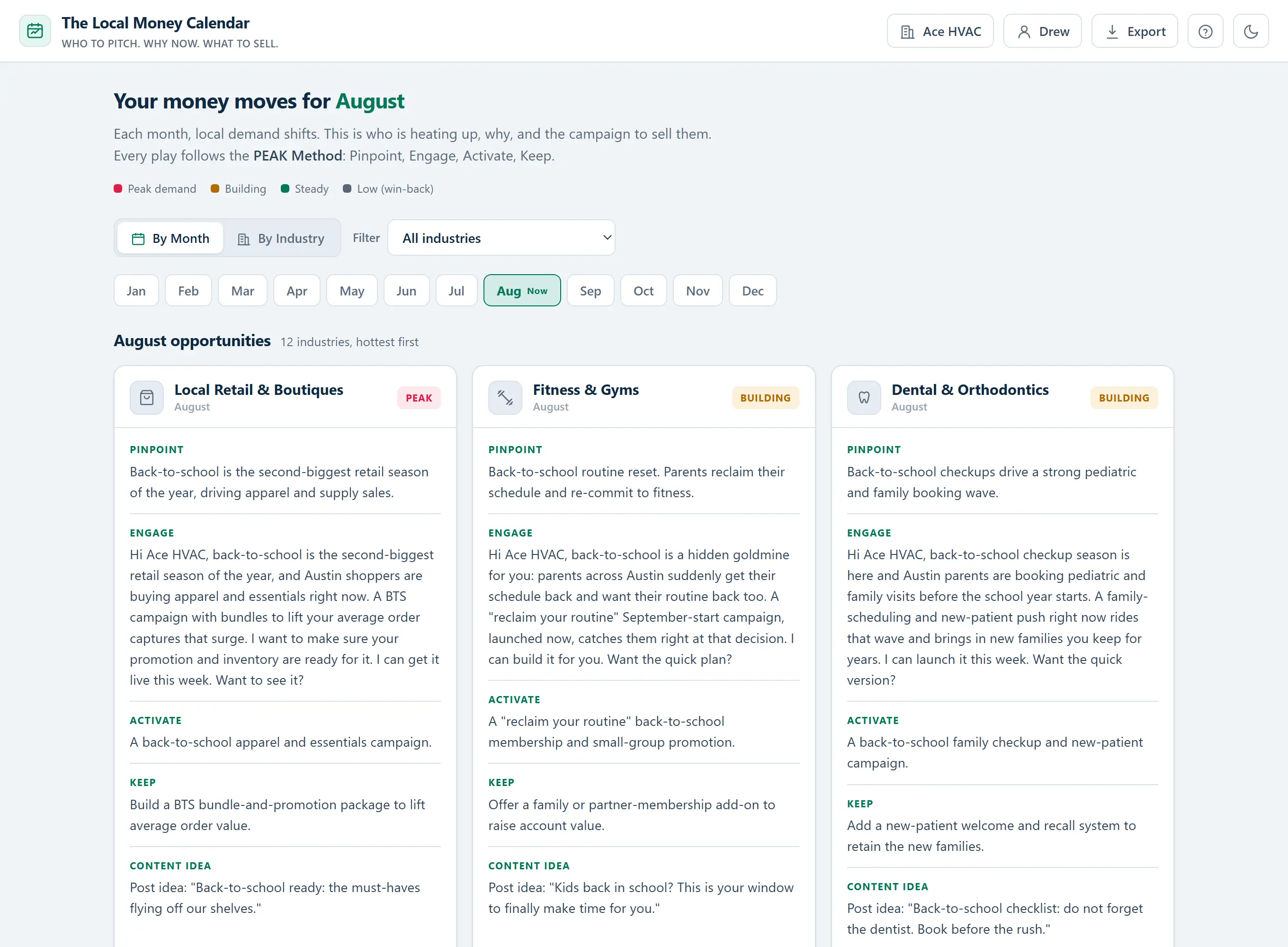
The full app, open on the current month. Every local industry sorted by who is heating up, each with a ready campaign and outreach message.
01
The 19-niche demand calendar
The core of the product. You always have a reason to reach out to someone.
Nineteen specific local niches, mapped across all twelve months. Every cell is a real opportunity: the business that is heating up, the seasonal reason the demand is there, and the campaign to sell them. Open any month and the work of figuring out who needs you is already done.
What's included
Nineteen niches, including home & trade broken into HVAC, roofing, plumbing, landscaping, pest, pool, and appliance, plus restaurants, breweries, med spa, salons, dental, fitness, real estate, automotive, retail, events, law, and accounting
228 monthly opportunities in total, one for every niche in every month
Each one includes the demand reason, the campaign to run, a ready outreach message, an upsell angle, and a content idea
Every month is scored by demand heat, so your hottest opportunities rise to the top on their own
Defensible seasonal logic behind every entry, framed as searches rising or a booking season starting, never invented statistics
You never sit down to prospect without knowing exactly who to contact and what to offer.
02
Two views: By Month and By Industry
Prospect this month, plan the whole year, from the same data.
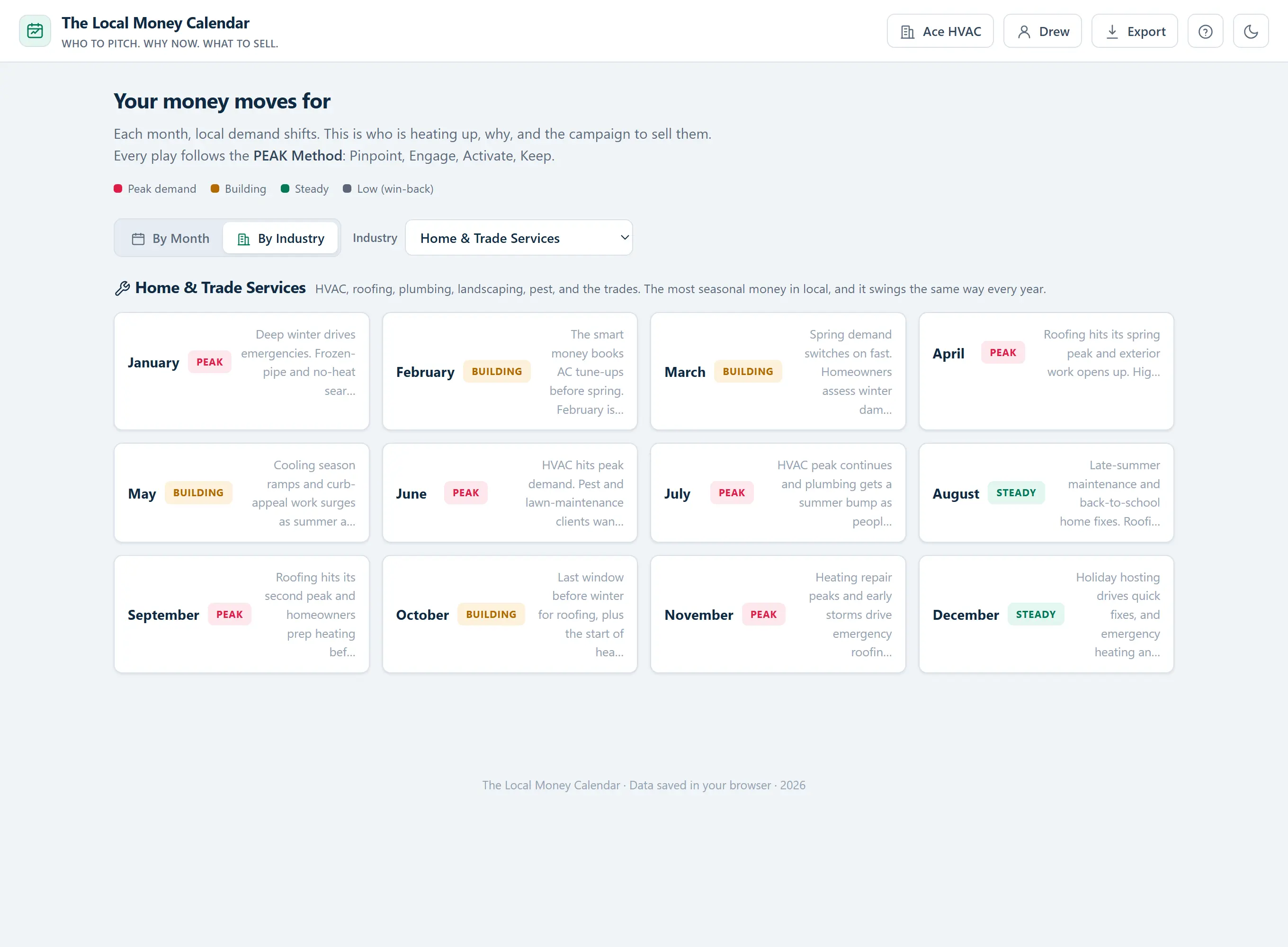
The calendar works two ways. By Month is your daily prospecting engine: it opens on today and stacks every industry by who is heating up right now. By Industry is your planning tool: pick a niche and see its entire twelve-month arc on one screen.
What's included
By Month opens on the current month and sorts every industry hottest-first, so your best calls are always at the top
By Industry lays out a single niche across all twelve months, a ready-made year-long plan for any client
A "heating up next" look-ahead flags the industries about to spike, so you reach out before the rush, not during it
Filter to the one or two niches you serve and hide the rest
Switch views in a click without losing your place
One tool for finding work this month and keeping clients booked all year.
03
Copy-and-send outreach, personalized to your client
From "who do I pitch" to a message in their inbox in under two minutes.
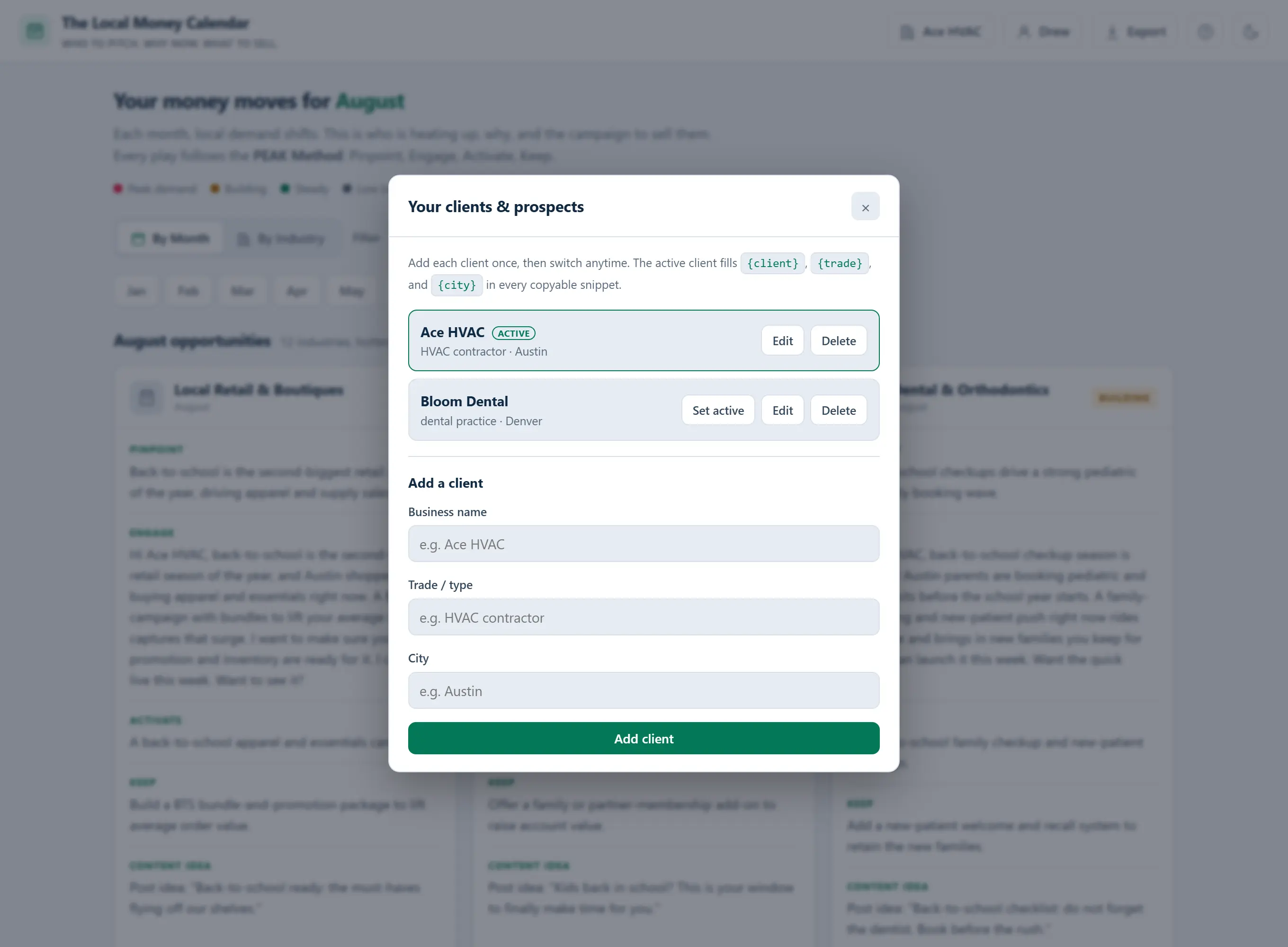
Knowing who to call is only half the job. The calendar closes the other half by handing you the actual words. Add your clients once, pick who you are working on, and every outreach message, content idea, and campaign brief fills in their business name, trade, and city automatically.
What's included
A built-in client manager so you can store every prospect and switch between them in a click
One-click copy for the outreach message, the content idea, and the full campaign brief
Your client's name, trade, and city drop into the copy automatically, so nothing reads generic
Printable, brandable one-page briefs you can hand a client or keep as your own working plan
Everything you type is saved right in your browser, on your device, and never uploaded
You edit a finished, personalized message. You never start from a blank page.
04
The AI Campaign Engine, built in
Turn any opportunity into a finished campaign in one click.
The calendar tells you who to pitch. When you want the whole campaign written too, the built-in engine does it. Pick any opportunity, click Generate, and get the full kit, personalized to your client, ready to edit and send.
What's included
One click produces an outreach email, a follow-up, a call script, social posts, a seasonal offer, and a landing-page angle
Bring your own AI key (Anthropic or OpenAI), stored only in your browser and sent only to that provider
No AI key? Copy the ready-made prompt into any free AI chat and get the same campaign
Save, download, or copy any campaign you generate, and add calendar reminders for the demand windows
The blank page is gone, whether you use AI or not.
05
The quick-start User's Guide
Up and running in your first sitting. No learning curve.
The calendar is simple on purpose, and the included User's Guide makes it faster still. It walks you through both views, the PEAK Method, adding your clients, and exporting briefs, in a five-minute read you can skim on your first open.
What's included
A guided walkthrough of both the By Month and By Industry views
How to run the PEAK Method on any opportunity, step by step
Setting up your profile and clients so the outreach personalizes itself
Exporting and branding a clean one-page brief to hand a client
Open it, read for five minutes, and start pitching the same day.
How it works
Three steps, and your first pitch is sent.
1Open it. It lands on the current month with every industry sorted by who is heating up, hottest first.
2Pick a target. Read the reason the demand is there, then copy the outreach message, already personalized to your client.
3Send and sell. Run the campaign it hands you, then do it again next month with a fresh set of reasons.
Why it works
Generic prospecting pitches tasks. The PEAK Method pitches timing.
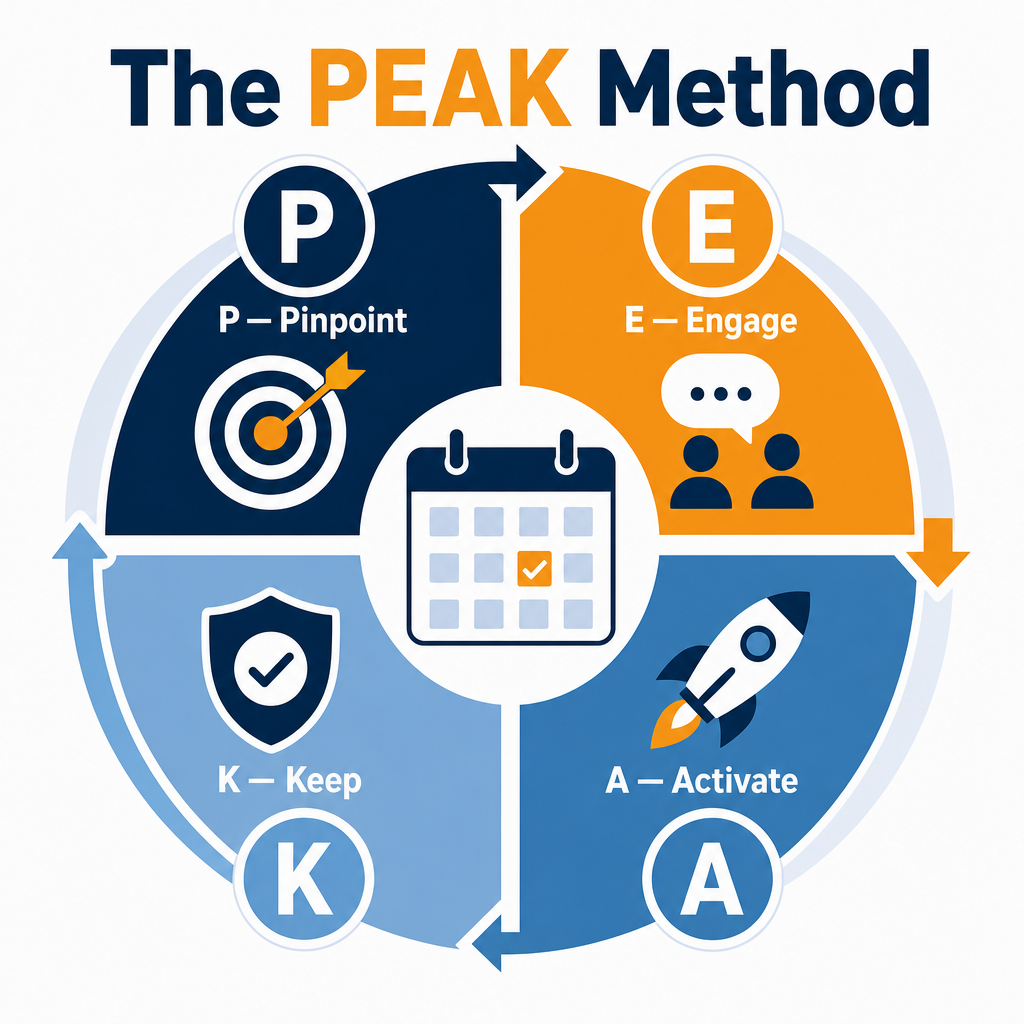
"You need a new website" lands as a cost. "Your busy season starts in three weeks, here is the campaign to win it" lands as an opportunity. Every play in the calendar runs the same four beats.
P for Pinpoint
Each month, the calendar surfaces the local businesses whose demand is climbing, and the exact seasonal reason it is climbing. You start the month knowing your ten best prospects, not staring at a blank list wondering who to call.
E for Engage
You get the words, not just the target: a ready-to-send outreach message personalized to your client, plus a content angle to warm them up first. No blank page, no limp "just checking in" that gets ignored.
A for Activate
The specific campaign to sell while demand is live, from the offer to the landing-page angle. And with the built-in AI engine, the whole thing writes itself in one click, personalized and ready to edit and send.
K for Keep
An upsell is built into every play, so a one-time win becomes a monthly retainer. You pitch next season's campaign before this one ends, and the client never has a reason to look elsewhere.
The old way
Cold, random, forgettable
Cold list in random order
"Let me know if you need help"
Pitch whenever you remember to
One-time projects that end
With the calendar
The right business, at the right time
The right business, at the right time
A specific offer they actually need now
A reason to reach out every single month
A built-in path to a retainer
Every niche included
The 19 local niches you get, each mapped across all 12 months
Real businesses you already know how to serve, every one with its own seasonal demand map. Need more? The Pro upgrade unlocks 31 more, for all 50, right inside the same app.
Home & Trade
HVAC · Roofing · Plumbing · Landscaping & Lawn · Pest Control · Pool Service · Appliance Repair
Restaurants & Food
Restaurants · Breweries, Wineries & Distilleries
Beauty & Aesthetics
Salons, Spas & Beauty · Med Spa & Aesthetics
Professional & B2B
Law Firms · Accounting & Tax
Auto, Fitness & Dental
Auto Repair & Service · Fitness & Gyms · Dental & Orthodontics
Real Estate, Retail & Events
Real Estate · Local Retail & Boutiques · Events & Weddings
Put it to work
Seven ways consultants use the calendar to grow
The calendar is the asset. How you deploy it is where the money is. Here are the most effective ways to put it to work from day one.
01Land new clients on timingOpen the current month, pick the businesses at peak demand, and send the outreach the week they actually feel the pain.
02Upsell the clients you already haveUse the Keep angle to pitch a timely add-on before their busy season, and turn a one-time project into a retainer.
03Plan a client's entire yearSwitch to By Industry and hand a client a 12-month plan that shows you were thinking three seasons ahead.
04Warm up cold prospectsLead with a timely, specific tip instead of a pitch. "Your busy season starts soon, here is what most shops miss."
05Fill your content calendarEvery month gives you a content idea per industry, so your own social never starts from a blank screen.
06Run a lunch-and-learnTurn a month's seasonal plays into a short workshop for local owners, then offer your services as the next step.
07Never miss a follow-up windowUse the look-ahead to reach a quiet prospect right before their demand spikes, when your timing looks uncanny.
Straight answers
What you are probably wondering
01"I only serve one or two niches."Filter to your industry and use just that. The By-Industry view maps its whole year for you.
02"Are these real demand claims?"Every entry is a defensible seasonal pattern, framed as searches rising or a booking season starting. No invented statistics.
03"Is my client data private?"Everything you enter is saved only in your browser, on your device. Nothing is uploaded.
04"I am not technical."If you can open a web page, you can use this. No install, no account, no setup.
05"Will the outreach sound generic?"Each message is written to send, then personalized with your client's name and city. You edit, you do not start from scratch.
06"I already have too many tools."This is one file. It replaces the blank page, not your stack.
Who this is for
Consultants who do their own outreach
Local marketing consultants and freelancers
Small agencies that serve local businesses
Anyone who wants a repeatable reason to reach out
Who this is not for
A few people it will not help
People selling to national or online-only markets
Anyone looking for a done-for-you lead list
Consultants who never do their own outreach
Why I built this
Drew Laughlin
Founder, MarketingConsultantPLR
I build tools and systems for local marketing consultants. Over 8,000 of them have bought more than 50,000 of my products, and 40-plus have earned Deal-of-the-Day awards. The Local Money Calendar started as one module inside a larger product, and the feedback was always the same: the seasonal calendar was the part people actually opened.
So I pulled it out, expanded it from one industry to nineteen (with all fifty in the Pro upgrade), and turned it into a standalone tool. It solves the problem I hear about most: not how to do the work, but how to know who to reach out to, month after month, without burning out on the blank page.
What consultants say
Real results from real consultants
Optional add-on at checkout
Want to get paid to run these plays, not just spot them?
The calendar tells you who to pitch and what to sell. The Client Season Plan Kit turns that into a client-ready deliverable you can present, price, and get paid for, month after month. On the order form below you can add it for a small one-time bump.
Inside the Client Season Plan Kit
The 12-Month Client Season Plan: a fill-in template that turns any niche's demand arc into a full-year plan
A Monthly Campaign Brief template so every month's deliverable is scoped and ready to build
A Fulfillment Checklist so nothing slips between "sold" and "delivered"
A one-page Client Proposal to present the plan and close the retainer on the spot
A Seasonal Retainer Pricing & Packaging guide, with a three-tier ladder so you know exactly what to charge
It is the difference between knowing the play and getting paid to run it. Look for the checkbox on the order form just below.
The offer
Pay once. It is yours for good.
Add up the pieces and it is worth $592. You pay a single time, keep it for good, and use it across every client you ever take on. Here is everything you get for that one payment.
Everything you get, one time
Not a subscription. Not one more login. You pay once, own it for good, and use it on every client you ever take on. Stacked up, here is what is inside.
The 19-niche demand calendar: 228 monthly plays, ranked hottest-first$197 value
The AI Campaign Engine: a full campaign for any niche in one click$147 value
Ready-to-send outreach, auto-personalized, plus the client manager$97 value
By Month + By Industry views, with the "heating up next" look-ahead$67 value
Saved campaigns, calendar reminders, and Print / Save-as-PDF briefs$47 value
The quick-start User's Guide$37 value
Total value$592
Your price today, one time...
One-time payment. No subscription. This is a digital product, so all sales are final.
Keep guessing
Stay on the blank list, keep the feast-or-famine cycle, and hope you remember to prospect this month.
Piece it together
Pay monthly for a posting tool and a copywriter, and still do the seasonal research yourself.
Get the calendar
Pay once, for about the cost of a client lunch, and open a finished answer to "who do I pitch" every single month.
Questions, answered
Before you decide
Do I need to install anything?
No. It is a web app that runs in any browser from your private access link. There is no login and no software to install, and your data stays in your browser.
Which industries are included?
Nineteen local niches. Home and trade is broken into HVAC, roofing, plumbing, landscaping, pest control, pool service, and appliance, plus restaurants, breweries, med spa, salons, dental, fitness, real estate, automotive, retail, events, law, and accounting. The Pro upgrade unlocks all 50.
Is this just another content calendar?
No. A content calendar tells you what to post. The Local Money Calendar tells you which local business is about to have demand, and the campaign to sell them. It is an outreach and revenue tool, not a posting planner.
What if I only work with one type of business?
Filter to your industry and ignore the rest. The By-Industry view maps that niche's entire year, which is a full outreach plan for the clients you already have.
Do I need to be tech-savvy to use it?
Not at all. It opens on the current month with your best prospects already sorted to the top, and a two-minute quick-start guide is included. If you can copy and paste, you can run it.
How is this different from just using ChatGPT?
ChatGPT can write, but it does not know which local business is heading into its busy season this month. The calendar hands you the target and the timing, then the built-in engine (or your own AI) writes the campaign. You start from a finished answer, not a blank prompt.
Do I have to pay extra for the AI?
No, and there is no separate subscription. Bring your own AI key from Anthropic or OpenAI and each campaign costs a few cents, or click Copy prompt and paste it into a free chat like ChatGPT, Claude, or Gemini for the same result.
What if my exact niche is not listed?
Pick the closest match; the seasonal demand pattern usually carries over. The Pro upgrade covers 50 niches, and there is a built-in Feature Request form to ask for new ones, which we add over time.
Does it work for my city or any location?
Yes. Add your client's city once and every outreach message and campaign fills it in automatically. The seasonal patterns apply anywhere in the country.
Can I use it with clients I already have?
Absolutely. Use the By Industry view to plan a client's whole year, and the Keep angle on each card to pitch a timely add-on before their busy season, turning a one-time project into a retainer.
How many clients can I use it with?
As many as you want. It is one payment for your own consulting use, across every client you ever take on, with a built-in client manager to store and switch between them.
Is my data private?
Yes. Your profile, clients, and saved campaigns are stored only in your browser, on your device. Nothing is uploaded, and there is no account to create.
Will I keep getting updates?
Yes. It is a one-time purchase you own for good, and new niches and improvements are added over time at no extra cost.
What is your refund policy?
All sales are final. Because The Local Money Calendar is a digital product that you get instant, permanent access to, we do not offer refunds. If you are unsure whether it fits your business, read this page and email us any questions before you buy, and we will help you decide.
Stop guessing who to pitch.
Every month, this tells you who is about to need you and exactly what to sell them. For less than a takeout dinner, open it once and you will never face the blank prospect list the same way again.