FOR CONSULTANTS WHO SERVE LOCAL BUSINESSES

Show local business owners the questions their website leaves unanswered.

Website Answer Audit reads up to 25 pages of a client’s site, sorts what’s missing into eight categories, and checks every finding against a quote from the page. You walk into the meeting with the questions customers still have, each one tied to the page that should answer it.

Run it with your own OpenAI key, or paste the prepared prompt into the AI chat you already use. Three steps from website address to printed report.

Start with one client website you already know.

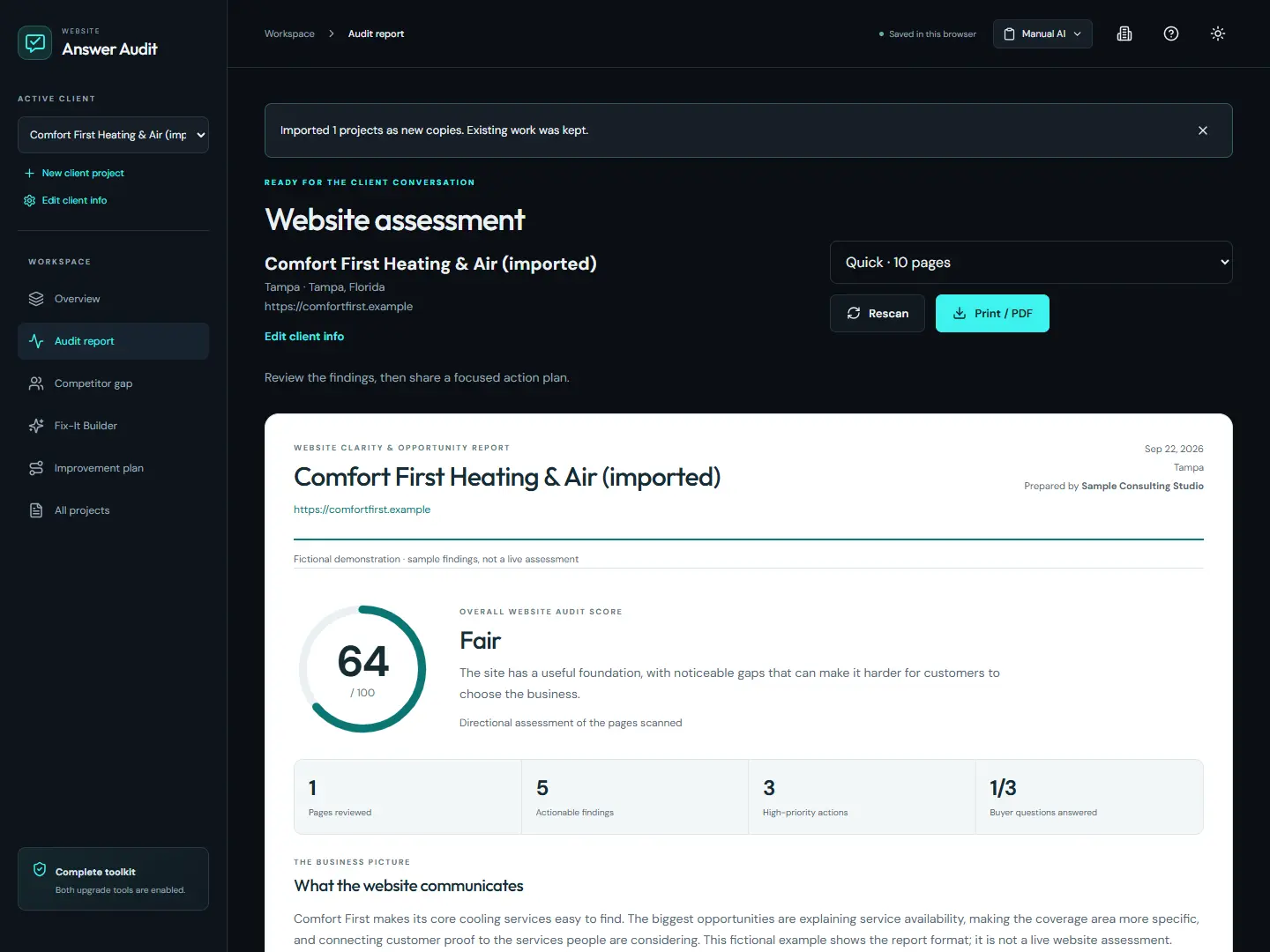
Website Answer Audit client report showing its score, category breakdown and report layout
The client report, shown with a sample business.
2010Creating tools for consultants since
8,000+Customers across Drew’s products
200+Products created
40+Deal of the Day awards
THE MEETING YOU KNOW

Why do business owners say “We already have all that”?

Because from where they sit, it’s true. The service is listed. The town is mentioned somewhere. What they can’t see is the question a customer still has after reading the page: do you cover my area, what happens after I call, why should I believe you?

You’ve been in that meeting. The owner points at the homepage. You open another tab, scroll, and try to turn a feeling into an explanation while they wait. Or you send a long report, and it sits unread in their inbox.

What moves the conversation is simpler: this page, this unanswered question, this change.

That’s what Website Answer Audit hands you. It doesn’t replace your judgment. It gives your judgment something concrete to point at.

THE ANSWER-TO-ACTION REVIEW

How does the Answer-to-Action Review work?

Every finding is tied to four things: the page it came from, a quoted excerpt, the customer question the page leaves open, and the change you’d recommend. The AI proposes findings. The app then checks each quote against the pages it actually collected.

If a quote can’t be matched, that finding is dropped from the client report and noted for you. A finding the page can’t back up never reaches the owner.

That’s the difference between “the copy needs work” and “your emergency service page never says whether you work weekends.” The first starts a debate. The second gets approved.

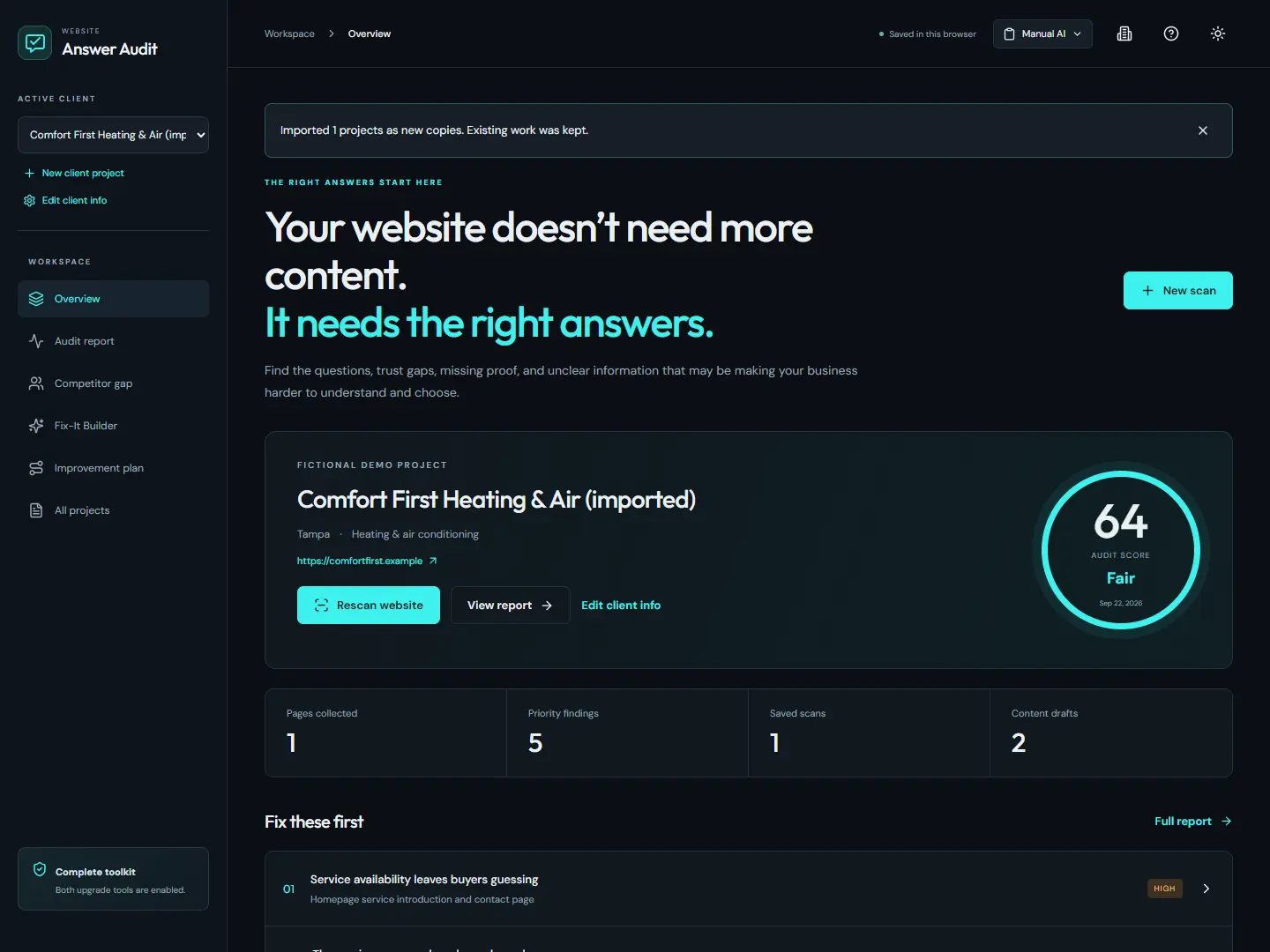
The client workspace with a sample HVAC business, saved scan count and priority findings
One workspace per client: business details, scan history and priority findings.
EVERYTHING YOU GET

What do you get with Website Answer Audit?

Four working parts in one browser-based app, plus an illustrated training guide. Each part feeds the same client conversation: what the website says, what customers still need to know, and what to change first.

The website answer audit

Collect a client’s important pages and see whether they actually answer what a customer needs, not just whether a keyword appears.

What’s included

  • Quick scans of up to 10 pages, Standard scans of up to 25
  • Eight categories, including services, local information and trust
  • Prioritized findings with the recommended change and where it goes
  • Coverage details and a plain-language score explanation

Every recommendation points to a page the owner recognizes.

Buyer questions and customer language

Paste in real reviews, emails or call notes, and see which customer concerns the website answers and which it ignores. No feedback on hand? The audit still runs.

What’s included

  • Answered, weak and missing buyer questions
  • Recurring concerns and themes from the feedback you supply
  • Inferred questions clearly marked for your review
  • Limited Data labels when no feedback is provided

You show the owner their customers’ words next to their own pages.

A client-ready report

Review the dashboard, then print the report to PDF with the client’s name and your agency’s details on it.

What’s included

  • Client name and optional client logo
  • Your agency details and a report accent color
  • Score interpretation, category breakdown and action cards
  • Scope and method notes, with your private review notes left out

You hand over something the owner can read without you in the room.

Saved client work and guided training

Keep each client’s scans together and pick up where you left off. The illustrated core guide walks you from setup to your first client handoff.

What’s included

  • Editable client details and saved scan history
  • Project export and import for backups
  • A ten-step walkthrough and searchable Help Center
  • The core training guide, with exercises and troubleshooting

When the site changes, you rescan instead of rebuilding your notes.

YOUR FIRST AUDIT

How do you run your first audit?

In three steps: add the business, collect and analyze its pages, then review the findings and print the report. You don’t need to change how your agency works to try it on one website.

1. Add the business

Enter the website, services and service area. Add confirmed details and customer feedback if you have them.

2. Collect and analyze

Choose Quick or Standard. Use your own OpenAI key, or copy the prepared prompt into your AI chat and paste the response back.

3. Review and share

Check the evidence, confirm the business facts, then print the client report. Export a backup before you move on.

WHAT THIS LOOKS LIKE

What does this look like with a real client?

The day before the meeting, you send the owner the PDF. The first action card quotes their own service page and names the question it skips. When you sit down, they bring it up before you do.

You scroll to the service-area finding. The owner names the towns they cover. You agree on the wording and where it goes. “Better content” has turned into a change somebody can approve.

A few weeks later, you rescan the site and check the published page against the new findings. Your follow-up email starts with what changed.

Will this still matter next year?

Search results and AI tools will keep changing. Customers will still need to know what the business does, whether it serves them, and why to trust it. Those questions are what the audit checks.

Every rescan reads the current pages, so the report reflects the site as it is today, not as it was when you bought the app.

Drew Laughlin, founder of MarketingConsultantPLR
WHY LISTEN TO ME

Who built Website Answer Audit?

I’m Drew Laughlin. I’ve built tools for marketing consultants and agency owners since 2010, and the ones buyers keep using have one thing in common: they give the consultant something to show a client, not something to explain.

That’s what I built this for. A consultant shouldn’t need to be a software specialist to have a better conversation about a website. The report keeps that conversation tied to the owner’s own pages.

“This dashboard is going to be a great tool for sales conversations! It turns abstract issues into something that clients can see and feel.”

Wendy Yohe, Print & Digital Marketing, on Drew’s LAVAi audit tool

Drew Laughlin
Founder, MarketingConsultantPLR

CUSTOMER FEEDBACK

What do customers say about Drew’s tools?

Consultants who use Drew’s other tools talk about seeing the gaps clearly and having something to show clients.

A DIFFERENT KIND OF AUDIT

How is this different from a standard SEO audit tool?

A standard tool tells you what’s technically wrong. Website Answer Audit tells you what a customer still doesn’t know after reading the page, and what to change. One checks how the page is built. The other checks what it tells the customer.

A typical audit tool exportWebsite Answer Audit
Checks whether a keyword or tag is presentChecks whether the page answers the customer’s question
One page at a timeUp to 25 pages, so gaps across the whole site show up
A score with no explanationCategory context and a plain-language score interpretation
AI output taken on faithEvery quoted excerpt checked against the collected pages
Rebuild the presentation from your notesPrint the client report from the dashboard
IS THIS FOR YOU?

Who is Website Answer Audit for?

Consultants and agency owners who review local business websites and need to show owners, page by page, what their customers still can’t find. Whether you manage one client or fifty, you start with the website in front of you.

It’s built for you if…

  • You audit local business websites before quoting content, SEO or website work
  • You want findings an owner can’t wave off, because each one quotes their own page
  • You have reviews, emails or call notes and want the report to use them
  • You want to rescan after changes go live and show the owner what improved
  • You’d rather make a one-time purchase than add another monthly subscription

It’s not the right fit if you need…

  • A rank tracker or a Google Business Profile audit
  • PageSpeed scores or a technical SEO crawl
  • Software that edits or publishes the website for you
  • AI findings you won’t review before a client sees them

Get Website Answer Audit

Everything you need to run your first client audit this week.

Everything you get

Included with accessEstimated value
Website Answer AuditPage collection and eight-category diagnosis$97
Customer Language & Buyer QuestionsReal feedback matched against the website$47
Client-Ready ReportsYour agency details, the client’s logo, print to PDF$67
Saved Projects, Rescans & BackupsEvery client’s work in one place$37
Illustrated Core Training GuideSetup, first audit, evidence review and client handoff$49
Total estimated value$297

For comparison, white-label audit tools charge by the month. SEOptimer’s white-label plan starts at $39 a month.

YOUR THREE OPTIONS

What are your options?

You have three. Keep pointing at the website and saying it needs work, audit every page by hand, or give the evidence and the report a workspace built for this conversation.

Leave it as it is

The owner keeps saying “we already have all that,” and the conversation stays where it is.

Do it by hand

Open every page, write down the gaps, and format your own report. It works. It also costs you the hours before every meeting, for every client.

Use Website Answer Audit

Collect the pages, review findings that quote the site, and print a report built around what customers need to know. You spend the meeting on the fix, not on proving there’s a problem.

STRAIGHT ANSWERS

Frequently asked questions

Do I need an API key?

No. Manual mode gives you prepared prompts to copy into an AI chat you already use, then you paste the response back into the app. If you’d rather run analysis inside the app, BYOK mode uses your own OpenAI key, and OpenAI bills you for that usage.

Do I need technical skills?

No. You enter the website address and business details, choose a scan size and follow the ten-step walkthrough. The core training guide covers setup, your first audit and the client handoff.

Can I use the reports with clients?

Yes. Add the client’s name and logo plus your agency’s contact details, review the findings, then print the report to PDF. Your private review notes stay out of the client version.

Does it work on every website?

It reads public pages: the homepage and the most relevant pages it finds, up to 10 on a Quick scan and 25 on a Standard scan. Sites that block crawlers or rely heavily on JavaScript may return fewer pages, and the report shows exactly what was collected.

Does the audit check Google rankings or AI recommendations?

No. It checks what the collected pages actually say. It doesn’t track rankings or test whether an AI recommends the business. Clear answers and proof on the page give both customers and search tools more to work with.

What if I already use an SEO tool?

Keep it for rankings, speed and technical checks. Website Answer Audit covers what those tools skip: whether the pages answer customer questions and back up their claims.

Will the app change the client’s website?

No. It reads pages and reports findings. You or the client’s web editor make the changes you agree on.

Where is my client work saved?

In your browser. Export a backup file to keep a copy or move work to another computer. When you run AI analysis, the page text and any feedback you add go to your AI provider. A saved API key is never included in backups.

How long does the launch discount last?

The 12OFF code works for the first 50 buyers, then checkout stops accepting it. The launch price ends when the launch closes, and the price goes up after that.

Is there a refund?

No. All sales are final. Before you buy, look at the screens on this page and read what the audit does and doesn’t cover, so you know it fits how you work. And if any scan won’t run, contact support and we’ll help you get it working.

YOUR NEXT CLIENT MEETING

Walk in with the page, the question and the change.

Pick one client website. Run the audit. Show the owner exactly what their customers still need to know.

Get Website Answer Audit